What Is Loop Engineering? How to Build AI Loops That Check Their Own Work
Running the same prompt ten times is not a loop. Google AI PM Shubham Saboo breaks down the nine parts of a reliable AI loop, builds one end to end, and shows the five ways loops fail in production.

What is loop engineering?
Loop engineering is the practice of designing an AI system that takes an action, checks the result against a clear goal, learns from what failed, adjusts and tries again, then stops on its own or hands over to a person when it should.
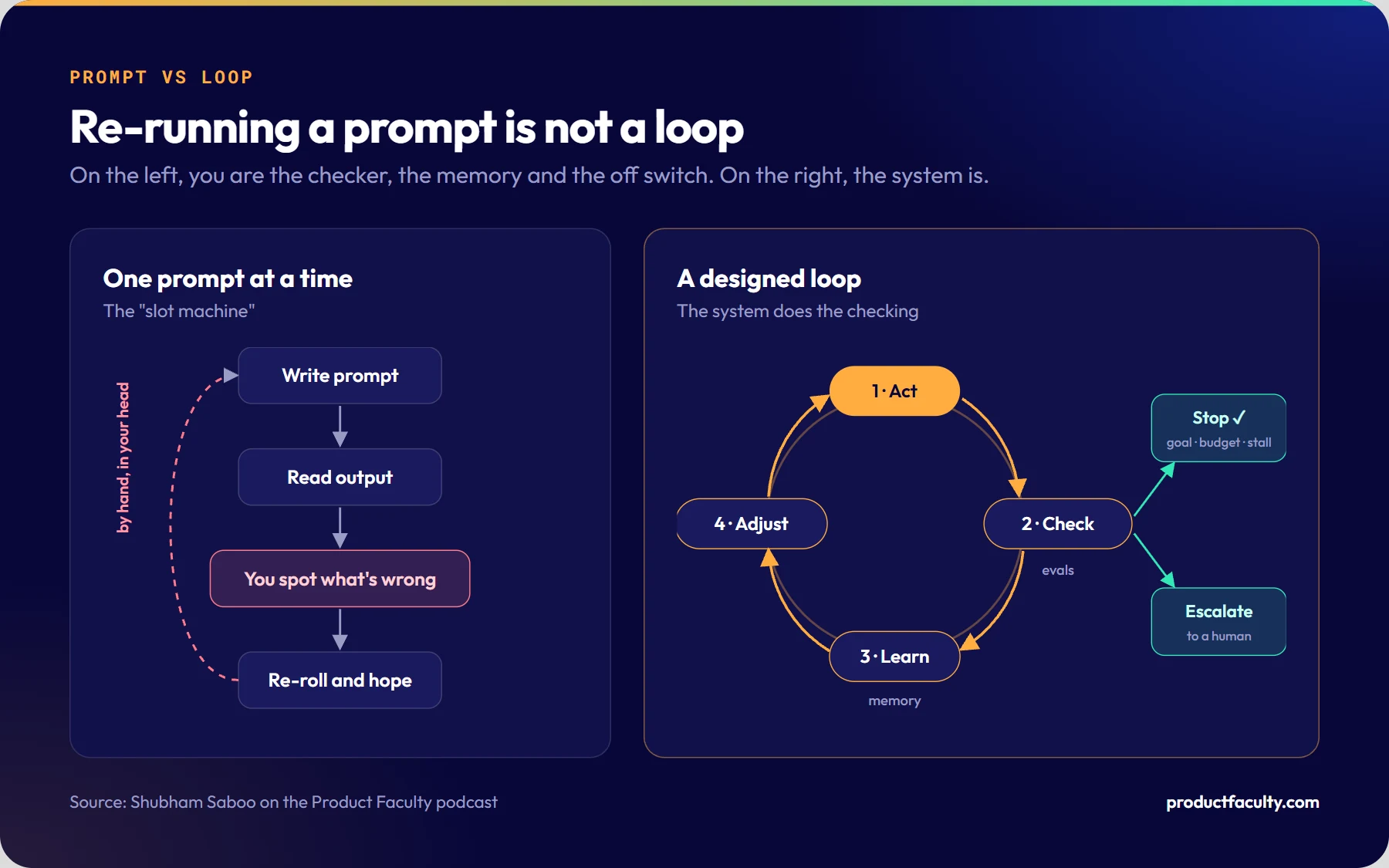
Most people still use AI like a chatbot. You open a tool, write a prompt, read the output, correct it and run it again. Shubham's point is that when you do this, you are already running a loop. You are just running it by hand, in your head: you are the quality checker, the memory of what went wrong and the off switch.
"Running the same prompt 10 times is not a loop. That is a slot machine, and you're just re-rolling, hoping to get a better result."
Shubham Saboo
The episode in numbers
Prompt vs agent vs loop: what's the difference?
The three get mixed up all the time. A prompt asks once, an agent can act with tools, and a loop wraps those actions in a goal, a judge and rules for when to stop.
| Feature | Prompt | Agent | Loop |
|---|---|---|---|
| What it is | One request, one answer | A model that takes actions with tools | Actions repeated against a goal until it is met |
| Who checks the output | You, by reading it | Usually you | Built-in evals: a rubric, tests or a second model |
| Memory between attempts | None, unless you paste it back in | Within one task | A log of what was tried, what worked and what failed |
| When it stops | After one answer | When the task looks done | At a target, a budget or a stall, set in advance |
| Human role | Does all the judging | Reviews the result | Sets the rules, approves what is escalated |
| Best for | One-off drafts and questions | Multi-step tasks with tools | Repeated work with a clear quality bar |
| Example | "Draft a reply to this customer" | Reads the ticket, checks the roadmap, drafts a reply | Improves the reply prompt round by round until it scores 4.5 of 5 on new cases |
In short: an agent is something a loop can use; a loop is the system that makes an agent's work dependable. Running the same prompt ten times is neither.
Why one prompt at a time stops working
Shubham gives three reasons a single prompt can't carry real work:
- Quality. Real work has a specific bar. A customer reply has to answer what was asked, promise nothing you haven't committed to and sound like your company. One prompt gets you a draft, not a reliable pass.
- Volume. 30 interview scripts, 200 support tickets, 500 feature requests. A prompt handles one item, and remembering what the first dozen said is on you.
- Drift. Your attention fades. You are rigorous on item one and skimming by item thirty, so consistency drops exactly when it matters most.
The four jobs you already do by hand
When you correct a model's output yourself, you are quietly doing four jobs. Loop engineering is writing them down well enough that a system can take them over.
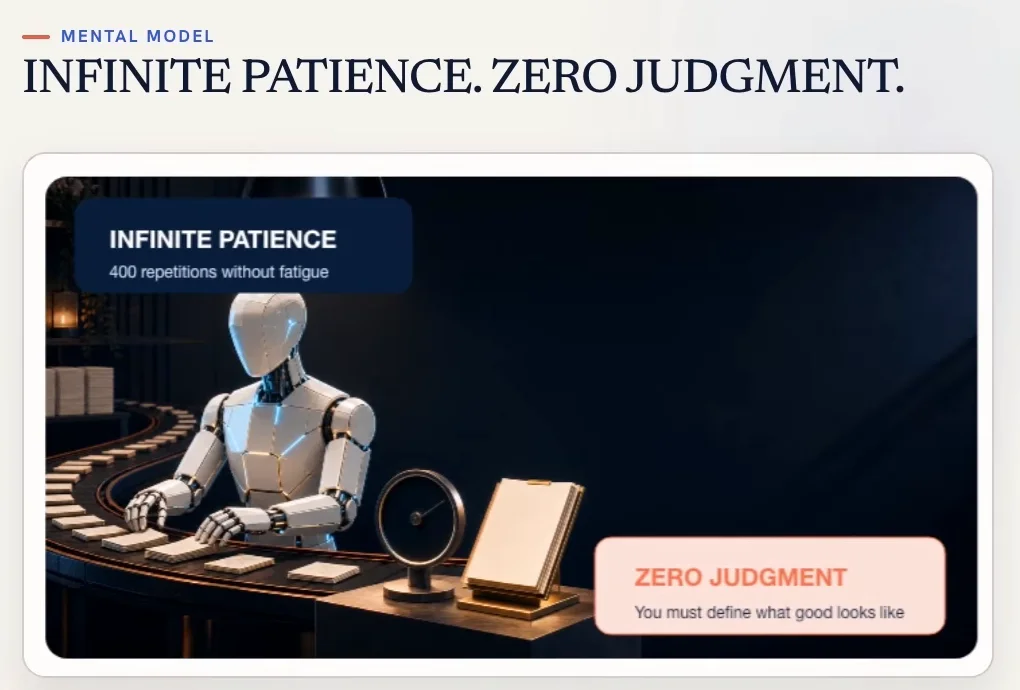
A useful way to picture the result: a loop is a junior employee with infinite patience and zero judgment. It will happily do the same task 400 times without getting bored. But it has no idea what good looks like unless you tell it. Everything that follows is what you would hand a new hire on day one.
The nine parts of a reliable AI loop
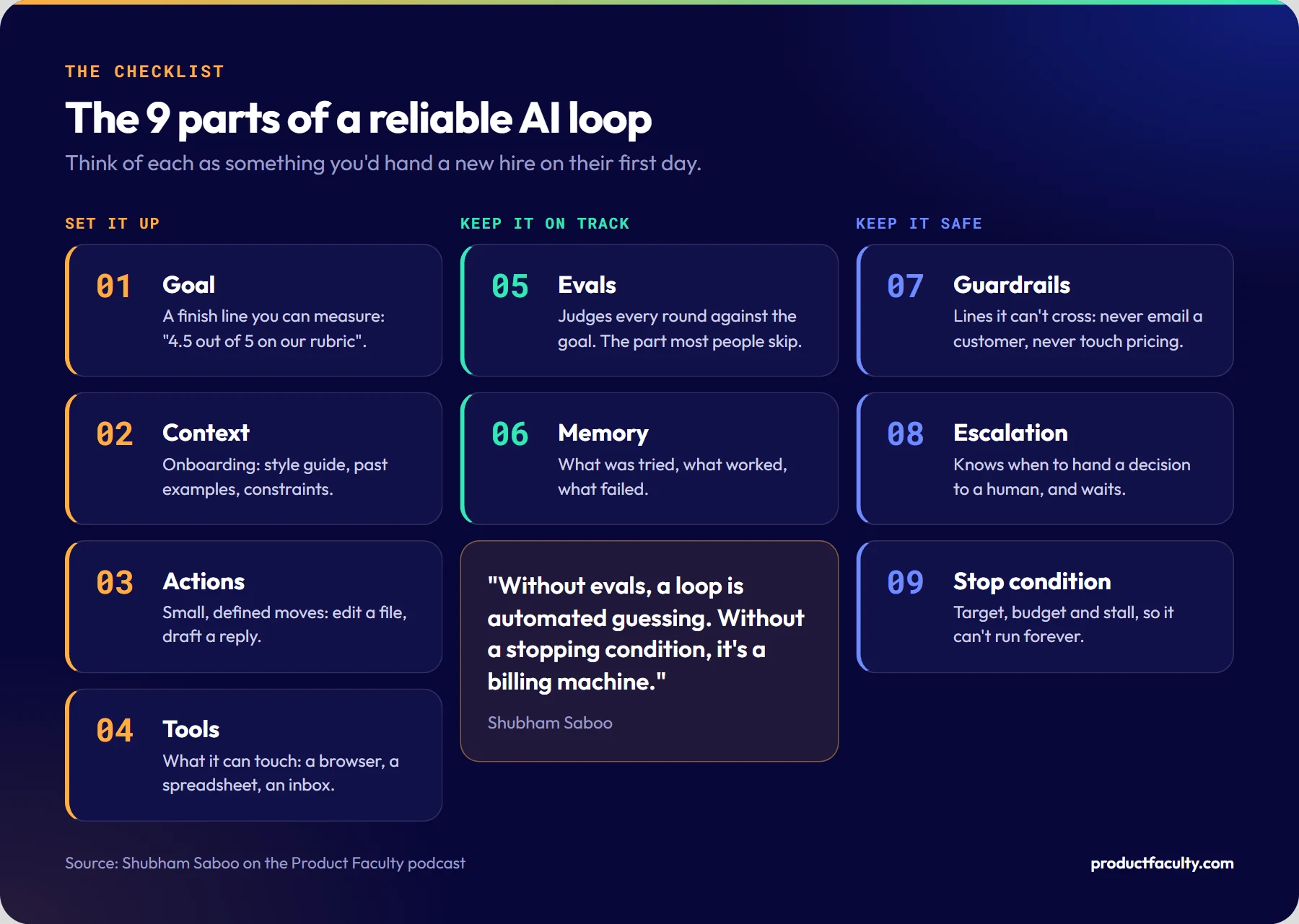
- Goal. A finish line you can measure. "An average of 4.5 out of 5 on our rubric" is a goal. "Great replies" is a wish.
- Context. What the loop knows going in: the style guide, past examples, constraints. Thin onboarding gives you confident garbage, at scale.
- Actions. The small, defined moves it may make each round, such as editing a file or drafting a reply.
- Tools. What it can actually touch: a browser, a spreadsheet, an inbox.
- Evals. Something that judges each round against the goal: a rubric, a test suite or a second model with strict criteria. The part most people skip.
- Memory. What was tried, what worked and what failed. If a failure isn't in the loop's history, it will repeat it.
- Guardrails. Lines it cannot cross, like never emailing a customer directly or never touching the pricing page.
- Escalation. Knowing when to hand a decision to a person and wait. Shubham's own agent reviews the 15 to 20 pull requests that reach his open-source repository each day and suggests what to do, but acts only after he approves.
- Stopping condition. When it is done, and when it quits even if it isn't.
Build one: the self-improving champion loop
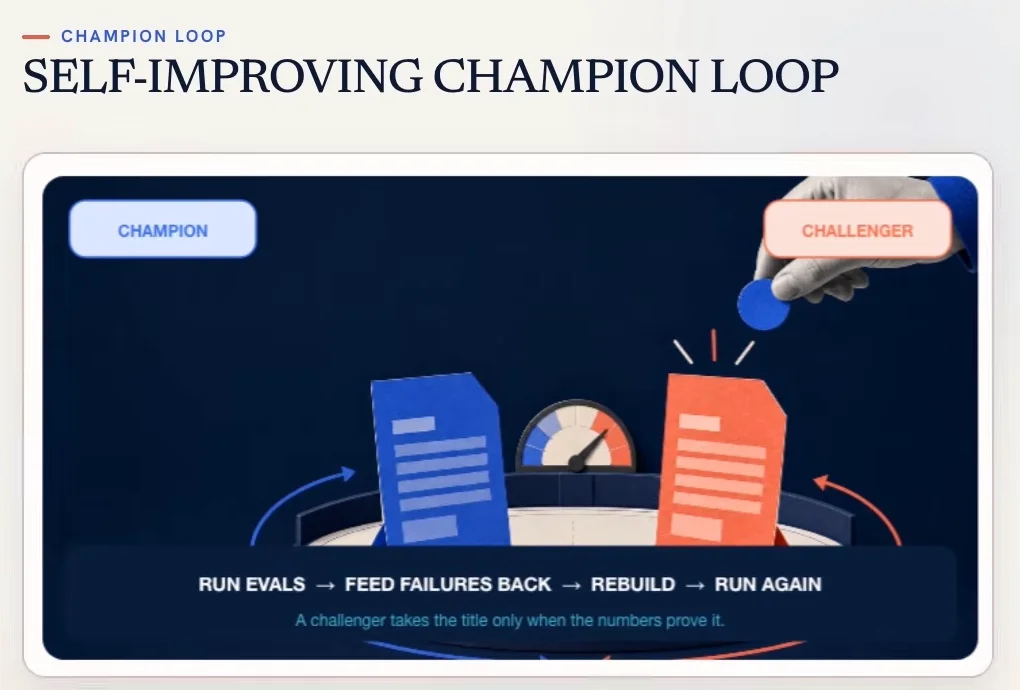
The first loop Shubham builds improves a prompt itself. His prompt drafts replies to customer feature requests and was "a solid six, maybe seven out of ten": sometimes it over-promised, sometimes it was generic. The current prompt is the champion, every proposed change is a challenger, and a challenger only takes the title by beating the champion in a fair, measured fight.
Step 1: Split the dataset
He pulled 40 real feature requests from the support inbox and split them before starting, just like a train and test split in classic machine learning.
- 25 cases in an improvement set the agent works with while it proposes and tests changes.
- 15 cases in a holdout set the agent never sees while improving. Only a change that beats the champion here gets promoted.
"If you take one thing from this build, take the holdout," Shubham says. If the loop is graded on the same cases it optimises against, scores go up while quality doesn't.
Step 2: Write a rubric of yes-or-no checks
Five binary checks, one point each:
- Does the reply restate the specific request?
- Is the stated status true?
- Does it avoid promising anything not on the committed roadmap?
- Does it match the tone guide?
- Is it under 120 words?
Concrete checks are far harder to game than "rate this reply from one to ten". As Shubham puts it, vague judges are the first thing that gets gamed.
Step 3: Measure a baseline
Before changing anything, the current prompt was scored on the 15 holdout cases: 3.4 out of 5. The weakest check was over-promising, which 10 of the 15 replies failed.
Step 4: Set the loop rules
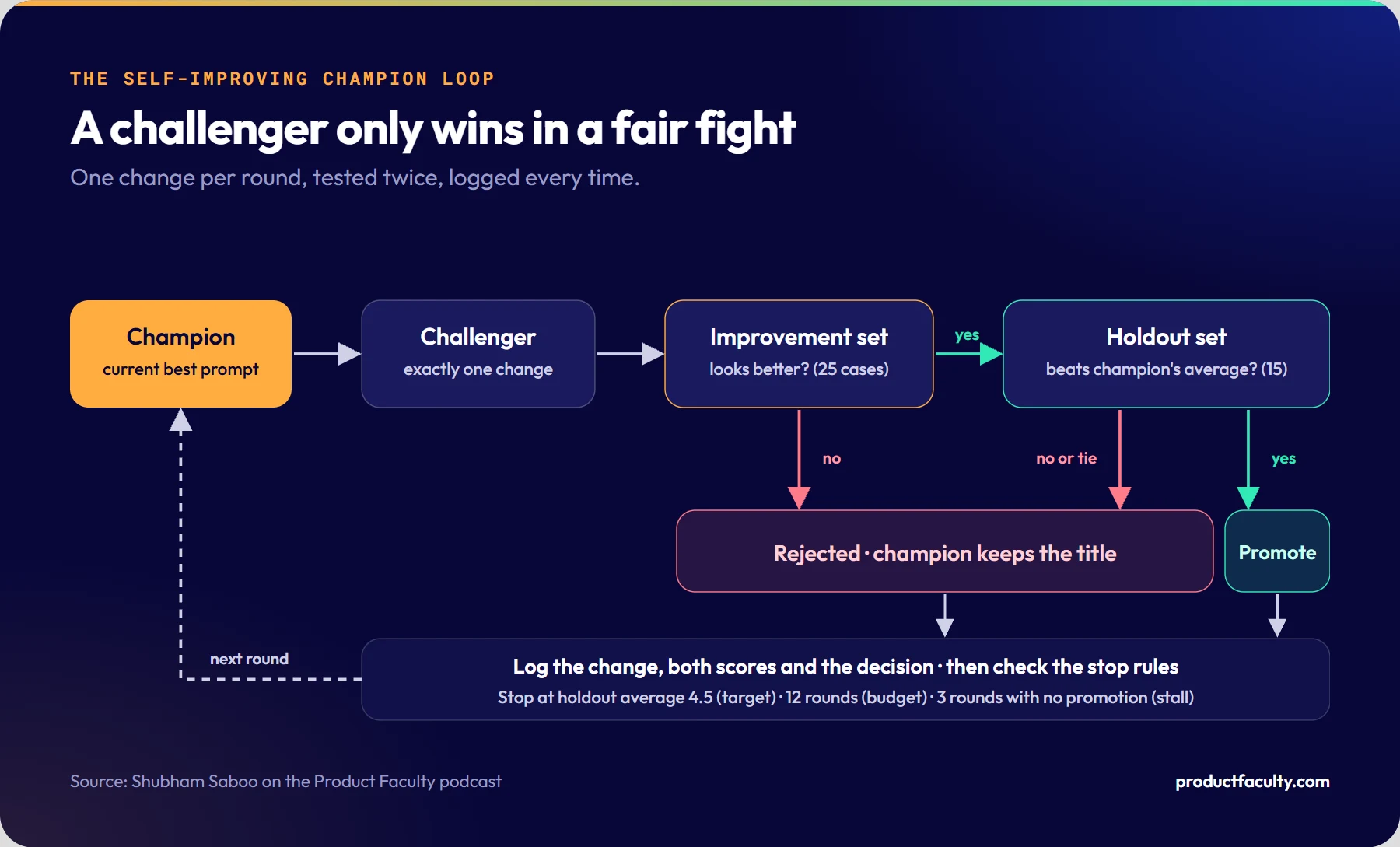
- Each round, the agent proposes exactly one change, so you always know which change moved the score.
- The challenger is tested on the improvement set first. If it doesn't look better, it is rejected and the reason is logged.
- If it does, it runs against the holdout and is promoted only if it beats the champion's average.
- The loop stops at a holdout average of 4.5, after 12 rounds, or after three rounds in a row with no promotion.
What happened when it ran
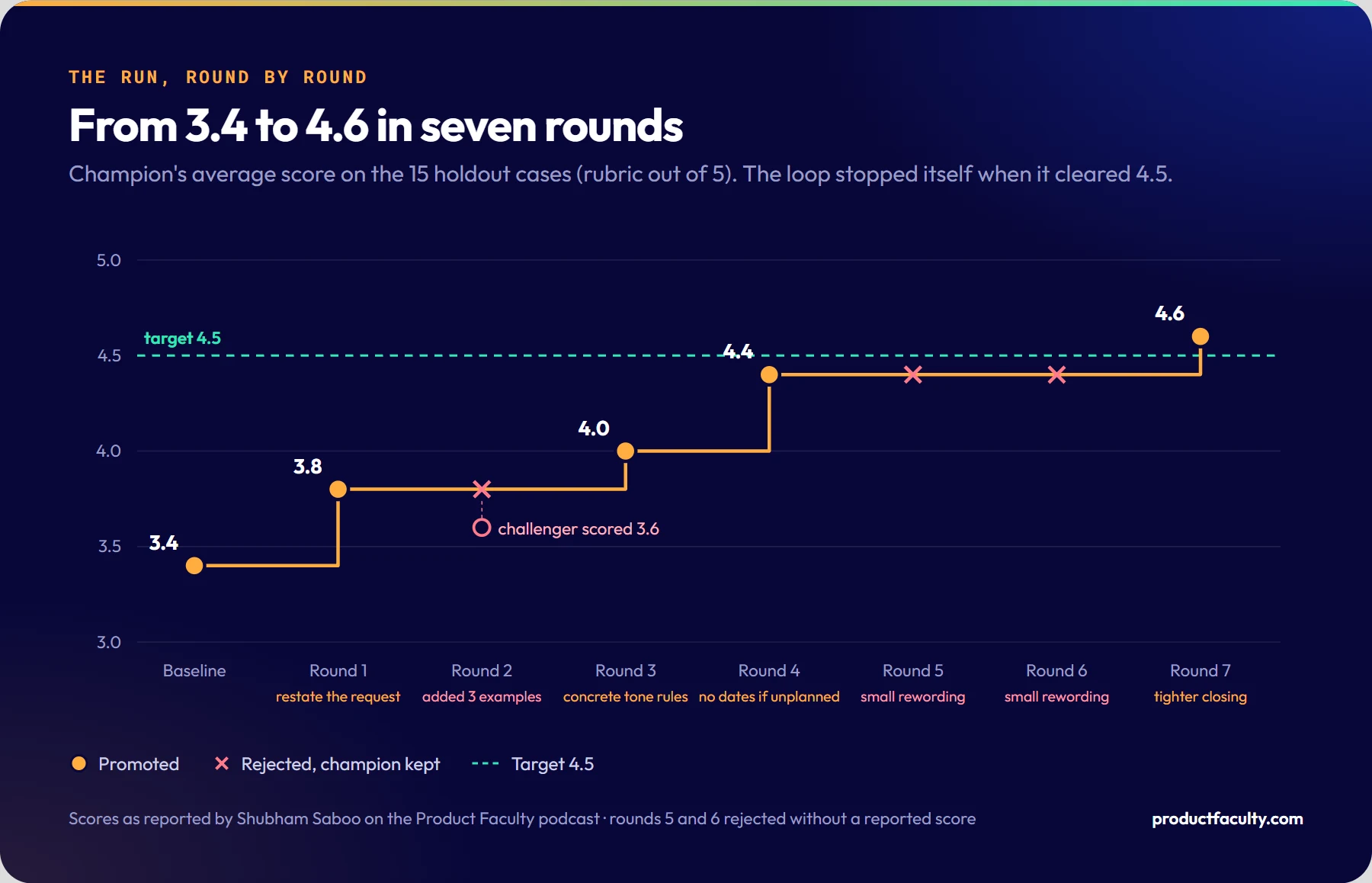
Round 2 is the one to remember. Adding three example replies lifted the improvement-set score by almost half a point, and Shubham admits he was tempted to ship it. On the holdout it scored 3.6 against the champion's 3.8, so it was rejected. The examples had taught the prompt to mimic the practice cases. Without the holdout, he would have shipped a worse prompt and felt good about it.
The biggest jump came in round 4 with one line aimed at the weakest check: "If the feature is not on the committed roadmap, say we are tracking demand and do not estimate a date." Round 7 cleared the 4.5 target, and the loop stopped itself and wrote a summary. The run took about 40 minutes unattended and cost around $2.
Even then, Shubham checks three things before trusting a result: he reads the log top to bottom, reads the holdout replies himself and checks the spend.
Four more loops you can copy
For each loop, ask the same three questions: what judges the work, what does it remember, and what makes it stop?
- Empathy simulation. Reads interview transcripts, tickets and survey answers in batches of 20, clusters the pain points and attaches a verbatim quote and source to every cluster. It stops at saturation: two batches with nothing new.
- Devil's advocate. A builder writes a PRD and a critic argues it is wrong. Every objection is either fixed or accepted with a written reason. Shubham's tip: use a different model for each role so no model grades its own homework.
- UI and UX improvement. Walks a real task in a fresh browser like a first-time user and scores every screen. On one run it found an error message that just said "Invalid input" and rewrote it to name the field and format, taking that screen from 2 to 4. Any change to pricing or legal copy goes to a human.
- Follow-up automation. Files a claim, tracks every deadline and follows up with the claim number and policy until the refund arrives or a person is genuinely needed.
All of these come from a public loop library of around 85 loops with full prompts.
Five ways AI loops fail, and the fixes
- Drift: restate the goal every round and read the log for direction, not just score.
- Weak evals: use yes-or-no checks on specific facts, plus your own spot checks.
- Cost: put a dollar cap in the stopping condition. "I'll keep an eye on it" is not a cap.
- Latency: run long loops overnight and read the log in the morning.
- Endless retries: give every threshold a companion: a round cap, a dollar cap or a stall rule.
That gives every loop three ways to stop: a target (the goal is met), a budget (a round or dollar cap) and a stall rule (several rounds with no progress). "If you only remember one, remember stall."
How to decide what belongs in a loop
Shubham uses three questions for any task on your plate:
- Automate what is checkable. If you can write down how you would judge the output (a rubric, a test, a saturation check, a deadline), a loop can run it. "If you can check it, you can loop it."
- Escalate what is consequential. Anything customer-facing, anything involving money and anything irreversible gets a human gate.
- Define the stop before you press run. Target, budget and stall. Writing it down first is the difference between a system and a gamble.
A loop that raises its hand at the right moment isn't failing. As Shubham says, it is suggesting, and you are deciding.
Your homework: a one-page loop spec
Pick one task you did three or more times this month and write four lines:
- The goal, as a number.
- The eval, as a check you would actually trust.
- The memory: what has to carry between rounds.
- The stop: target, budget and stall.
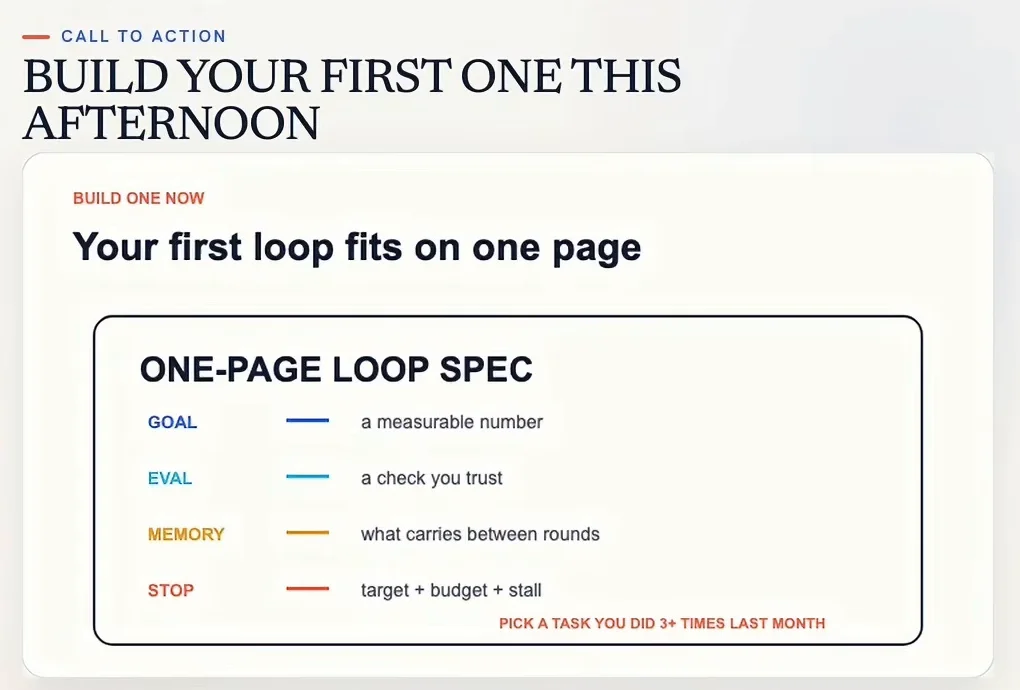
That page is your loop spec. It is also, as Shubham puts it, a job description for your next hire. "At some point, you're not really writing prompts anymore. You're staffing a team."
Watch the full episode
FAQ
What is loop engineering?
Loop engineering is designing an AI system that acts, checks its result against a measurable goal, learns from failures, adjusts and tries again, then stops or escalates to a person on clear rules. It turns the manual cycle of prompting, reading and correcting into a system.
How is an AI loop different from an AI agent?
An agent can take actions with tools. A loop wraps those actions in a goal, an evaluator, memory, guardrails and stopping rules so the work improves round after round and ends predictably. Re-running the same prompt without those parts is not a loop.
What are the nine parts of an AI loop?
Goal, context, actions, tools, evals, memory, guardrails, escalation and a stopping condition. Evals and the stopping condition are the parts most often missing.
Why do you need a holdout set?
If a loop is scored on the same cases it improves against, scores rise while real quality doesn't. A holdout set the loop never sees during improvement shows whether a change actually generalises.
When should an AI loop stop?
Give every loop three stop rules written before it runs: a target (the goal is met), a budget (a round or dollar cap) and a stall rule (several rounds with no progress).
What tasks are good candidates for a loop?
Repetitive tasks where you can write down how to judge the output, such as drafting replies, clustering research, reviewing documents, testing user flows or chasing follow-ups. Anything customer-facing, financial or irreversible should keep a human approval step.
Learn to build production AI loops
Shubham teaches Agentic Engineering in Product Faculty's AI Builder Fellowship, where you build a production agent system and run it unattended, not just a demo. To go deeper on judging AI output, see our AI Evals course.