How to Build AI Agents Without Coding: A Google AI PM's Step-by-Step Method
Google AI PM Shubham Saboo takes one idea through the whole agent development lifecycle using only English prompts to a coding agent: a clear spec, a working agent, local testing, a cloud deployment and an eval loop that fixes problems before users see them.
Can you build an AI agent without coding?
Yes. With a coding agent such as Claude Code, Codex or Antigravity, plus skills that teach it best practices, you can take an AI agent through every phase (spec, build, local test, cloud deployment and evaluation) using plain-English prompts and no hand-written code.
That's what Shubham Saboo, Senior AI Product Manager at Google, demonstrates in this crash course. "Your most valuable skill isn't writing every line of code yourself. It's understanding the problem deeply enough to communicate it clearly to your agent." You need English, a coding agent and an understanding of the phases. You don't need a technical background or knowledge of agent frameworks.
His example agent is an SRE triage agent: paste in system logs and it classifies the incident into one of three categories and writes an incident report. He built it on Google's open-source Agent Development Kit (ADK) without reading its documentation.
"You really need to be just a good PM or a problem solver, and you're automatically a builder today."
Shubham Saboo
The crash course in numbers
The new way to build: an MVP before engineering
In the old flow, a PM spent weeks gathering requirements, then weeks of feedback, before engineering poked holes in them and sent everything back. Shubham calls that "an act of translation" between teams.
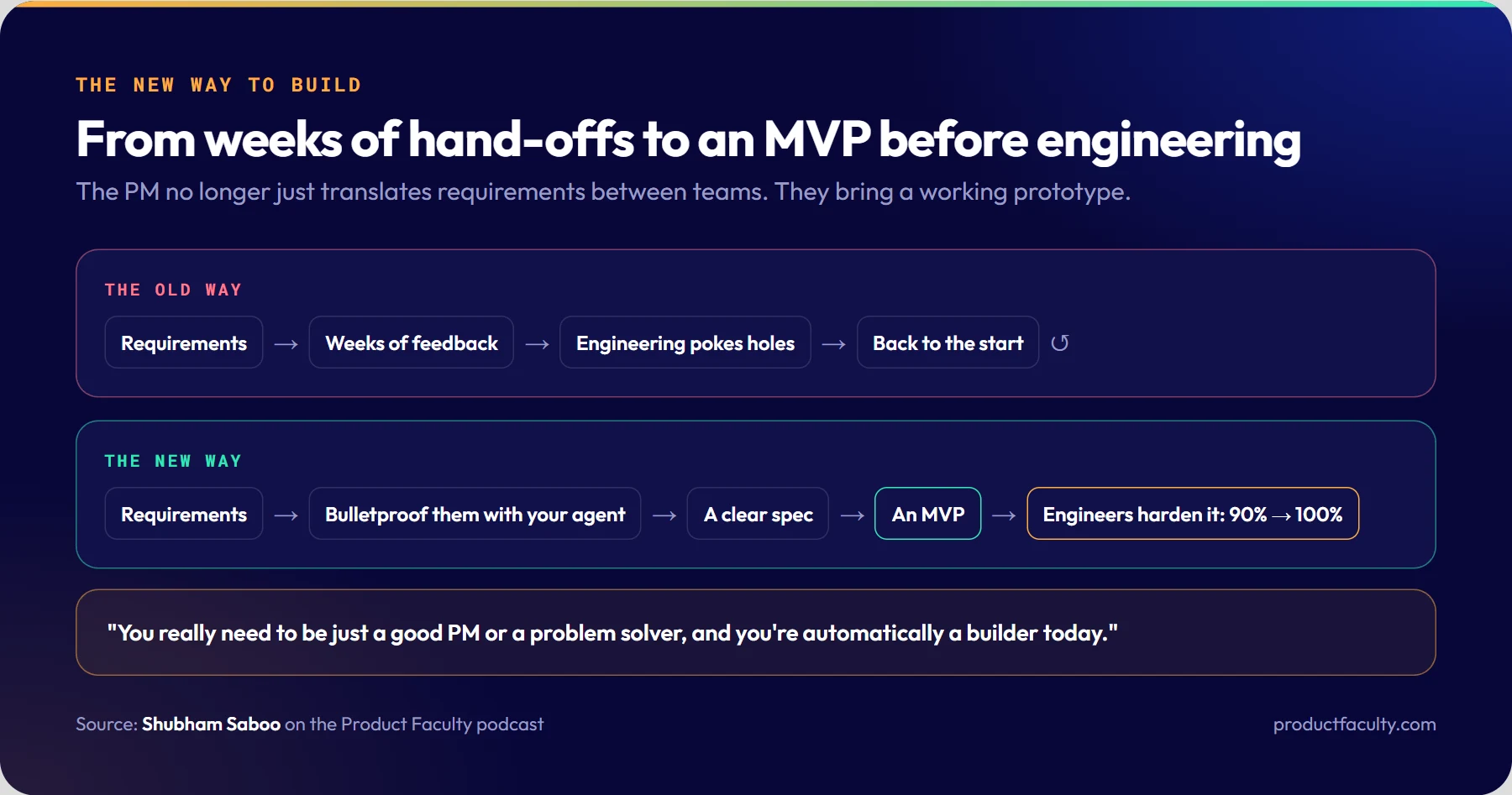
Now you work with your agent to bulletproof the requirements, turn them into a spec and build an MVP before you even go to engineering. Engineers get a precise blueprint of what the team wants, and their job becomes hardening it for production, "taking it from 90 to 100%."
Why "just ask Claude Code" isn't enough
You could simply ask a coding agent to build you an agent. Shubham says it might get it right 40 or 50% of the time, but you'll waste a lot of time going back and forth: it breaks, you test it, something else doesn't work. Even when it works, it may not follow the best practices you need in production.
Google's answer is Agent CLI, a free, open-source set of skills, installed with one command, that makes a coding agent an expert at each phase of the agent lifecycle on Google's stack. Skills, he explains, "are nothing but instructions for your coding agent on how to do a certain thing." They hold Google's own best practices, so the coding agent can build in zero shot instead of trial and error.
| Feature | Coding agent alone | Coding agent with skills |
|---|---|---|
| Gets it right | Maybe 40 or 50% of the time | In zero shot, in Shubham's demo |
| Process | Build, it breaks, test, back and forth | One plain-English prompt per phase |
| Best practices | May or may not follow them | Built in, from the team that made the framework |
| Result | Often a toy | Built for production from the ground up |
| Learning | You figure it out yourself | The coding agent explains as it goes, like a tutor |
The tools are Google-specific, but Shubham stresses the method isn't. "This is not a Google pitch." The same process should work on any cloud provider with the right skills. The concepts to keep are the phases, the process and the mental models.
There's a learning bonus too: your coding agent becomes your tutor. When Product Faculty's CEO Moe Ali started, he told Shubham he had no idea what the agent platform or ADK were. The advice was to ask the coding agent. "Soon he started building stuff and deploying stuff, because everything was educational."
The agent development lifecycle, step by step
Your entry point is your coding agent, not an IDE. "Every phase becomes one natural-language prompt."
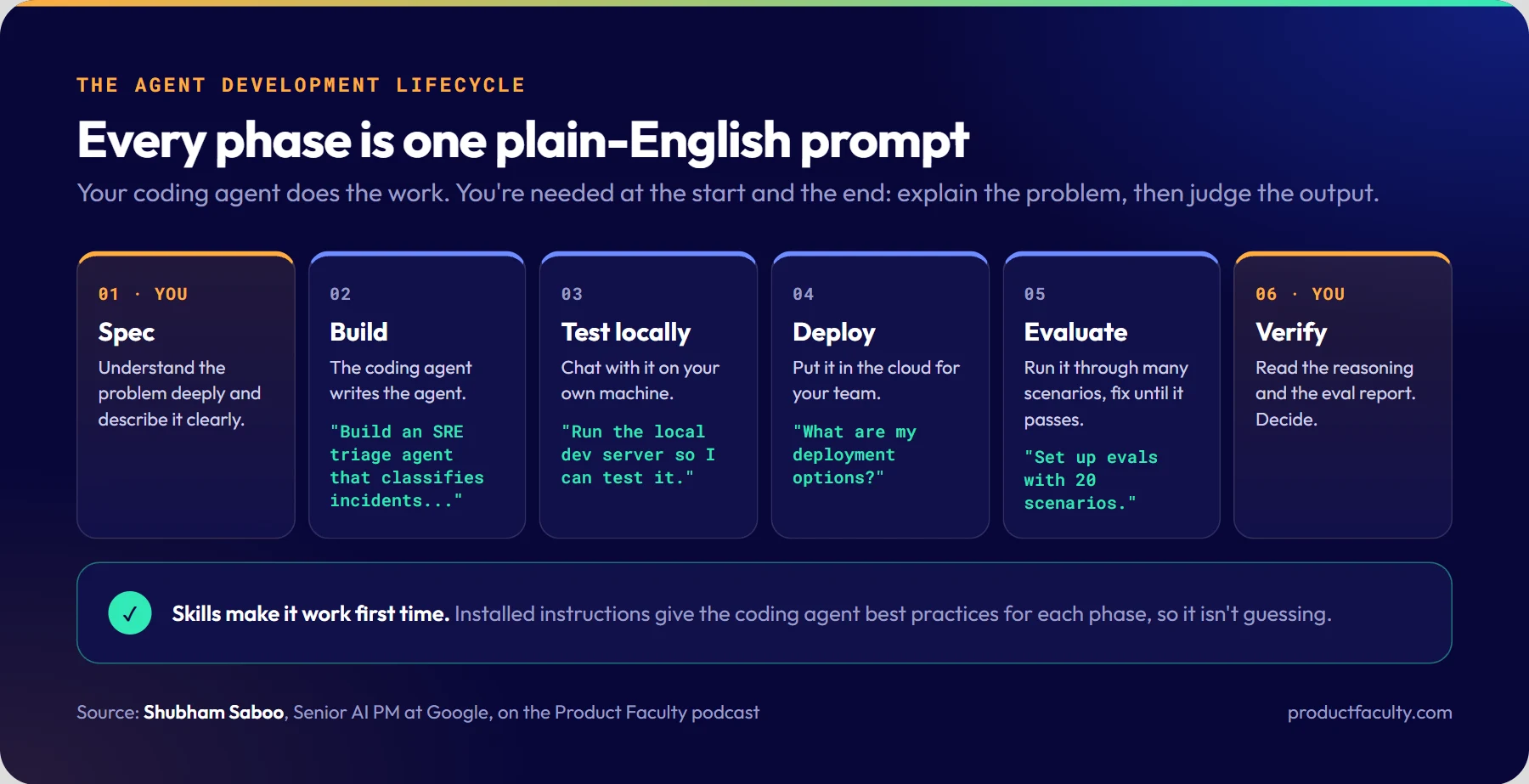
- Install the skills. "Check if Google Agent CLI is available and show me the skills. If not, install it." You don't need to understand the install command; paste it into your coding agent.
- Build. Describe the agent in detail: an SRE agent that classifies any incident into three categories, built with ADK and the 3.5 Flash model. "Just build the agent, don't get into testing or evaluation yet." It ran for about six minutes and produced the code plus a project spec in plain English that you can read to understand what it built.
- Test locally. "Run the local dev server so I can test it." He didn't know the command or read any docs. A chat playground opens, he pastes sample logs and it writes an incident report. In real use, the logs could be pages long or streaming live, and the reports could go to Slack or email.
- Deploy. "What are my deployment options?" The coding agent explained three, he picked the simplest and asked it to deploy to his cloud project. After 5 to 10 minutes of setup, the same agent was live on Google Cloud for anyone in the organization to use.
- Evaluate. "Set up proper evals with 20 different scenarios: some with only errors, some with mixed logs, some with nothing critical. Run them and give me the results." More on this below.
Long jobs don't need babysitting. The eval run took about 16 minutes, and the coding agent app notifies you when it's done.
The eval-fix loop
Traditional software has unit and integration tests that cover corner cases. Agents are different: "They are non-deterministic to start with. They are subjective. They are qualitative." You can still test the deterministic parts, but you can't write a test case for every way a real user might phrase things. And one person testing by hand for an hour will miss edge cases.
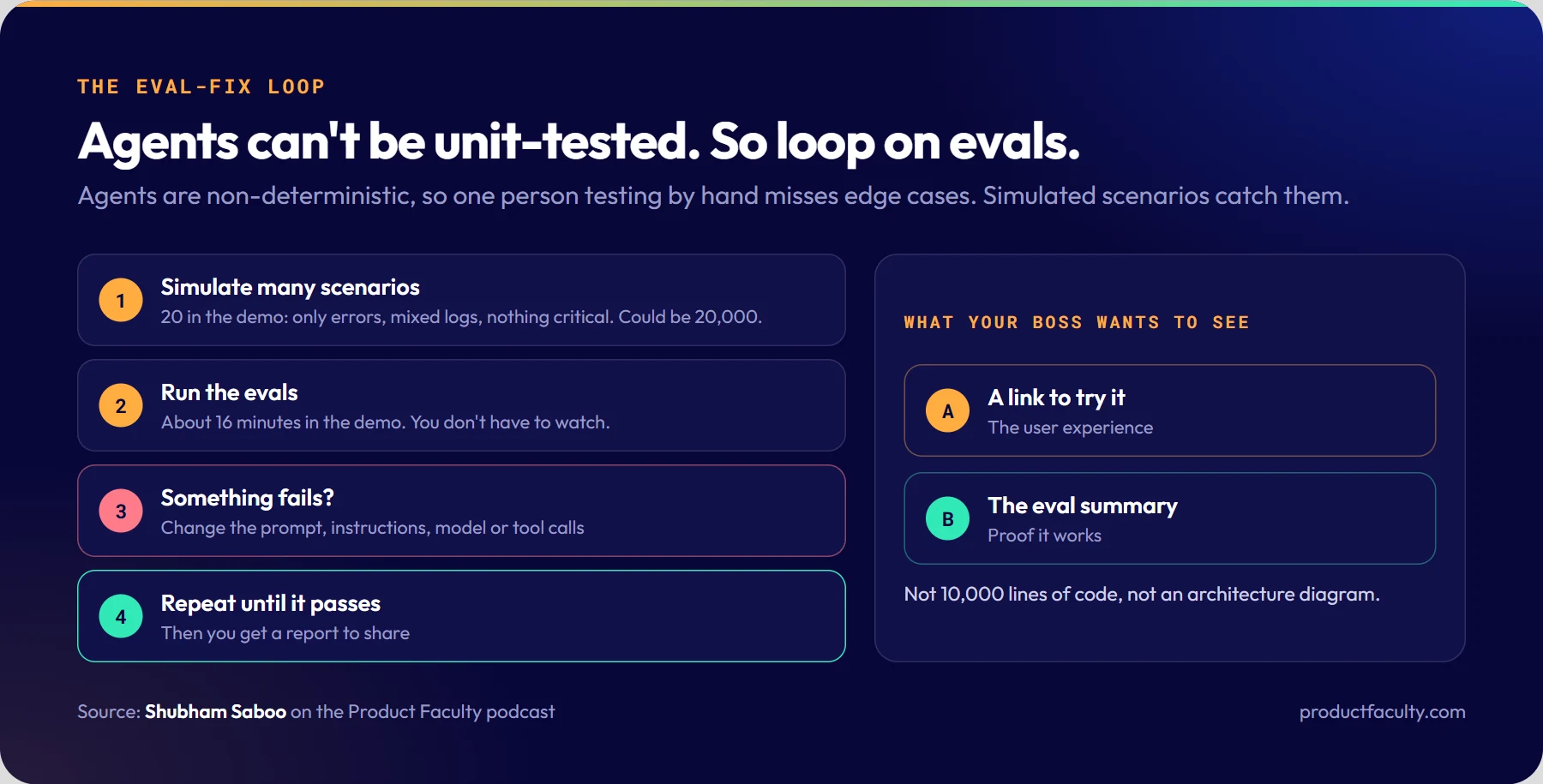
That's why you need simulated scenarios. ADK can simulate users, so the coding agent generates diverse cases (20 in the demo, but it could be 200, 2,000 or 200,000 depending on how critical the agent is) and runs the agent through them. If some fail, the skills tell it to change the prompt, instructions, model or tool calls and run again until they pass.
"You might have heard about loop engineering and loops," Shubham says. "This is a real loop in practice." His simple demo agent passed all 20 scenarios, and you can keep asking for more eval data until you're satisfied.
Your job: verify the output
None of this means you should run it blind. "That does not mean go and run YOLO." If you're learning, open the coding agent's "show thinking" view to see how it reasoned, how it created the eval set and how it judged each case.
Shubham calls this the most important skill: understanding the problem and verifying the output. The output might be the agent itself, which you test by hand; the eval summary and report; or the scenarios the coding agent generated. Read them. That's where your judgment matters.
What to show your team
The coding agent also produced an HTML evaluation report: the metrics, the 20 cases and how each went. That makes the next step easy, because people reviewing an agent want two things:
- A link to try it, so they can judge the experience themselves.
- The eval summary, so they can see numbers showing it works as expected.
"They don't want to look at your 10,000 lines of code." Between a live link and an eval report, you cover both the qualitative and the quantitative case.
Try this week
- Pick one repetitive problem and write two sentences explaining it clearly, including what a good output looks like.
- Install a skills pack for your coding agent and your platform, such as Agent CLI for Google's stack.
- Build only in your first prompt. Ask it to skip testing and evals for now.
- Ask it to run the agent locally and try it with real examples.
- Ask for 20 eval scenarios, including tricky ones, and read the scenarios and results yourself.
Watch the full crash course
FAQ
Can you build an AI agent without coding?
Yes. Using a coding agent such as Claude Code, Codex or Antigravity with skills that encode best practices, you can spec, build, test, deploy and evaluate an AI agent through plain-English prompts, without writing code by hand.
What is the agent development lifecycle?
It is the set of phases an AI agent goes through: writing a clear spec, building the agent, testing it locally, deploying it to the cloud, evaluating it across many scenarios and having a person verify the results before it is relied on.
What is Agent CLI?
Agent CLI is Google's free, open-source set of skills for coding agents. Installed with one command, it teaches a coding agent best practices for building, testing, deploying and evaluating agents with Google's Agent Development Kit on Google Cloud.
What are skills for coding agents?
Skills are written instructions that tell a coding agent how to do a specific task well. They give it expert context, such as how to scaffold an agent or set up evaluations, so it gets things right without repeated trial and error.
Why can't you unit-test an AI agent?
AI agents are non-deterministic and their outputs are qualitative, so the same input can produce different valid answers and users phrase things in endless ways. Teams test the deterministic parts and use evaluations on many simulated scenarios for the rest.
What is an eval-fix loop?
An eval-fix loop runs an agent through a set of evaluation scenarios, and when some fail, changes the prompt, instructions, model or tool calls and runs them again until they pass. It catches problems before the agent reaches production.
Learn to build and ship agents
Shubham teaches Agentic Engineering in Product Faculty's AI Builder Fellowship, where you build and deploy production agent systems. To go deeper on evaluating AI output, take AI Evals.